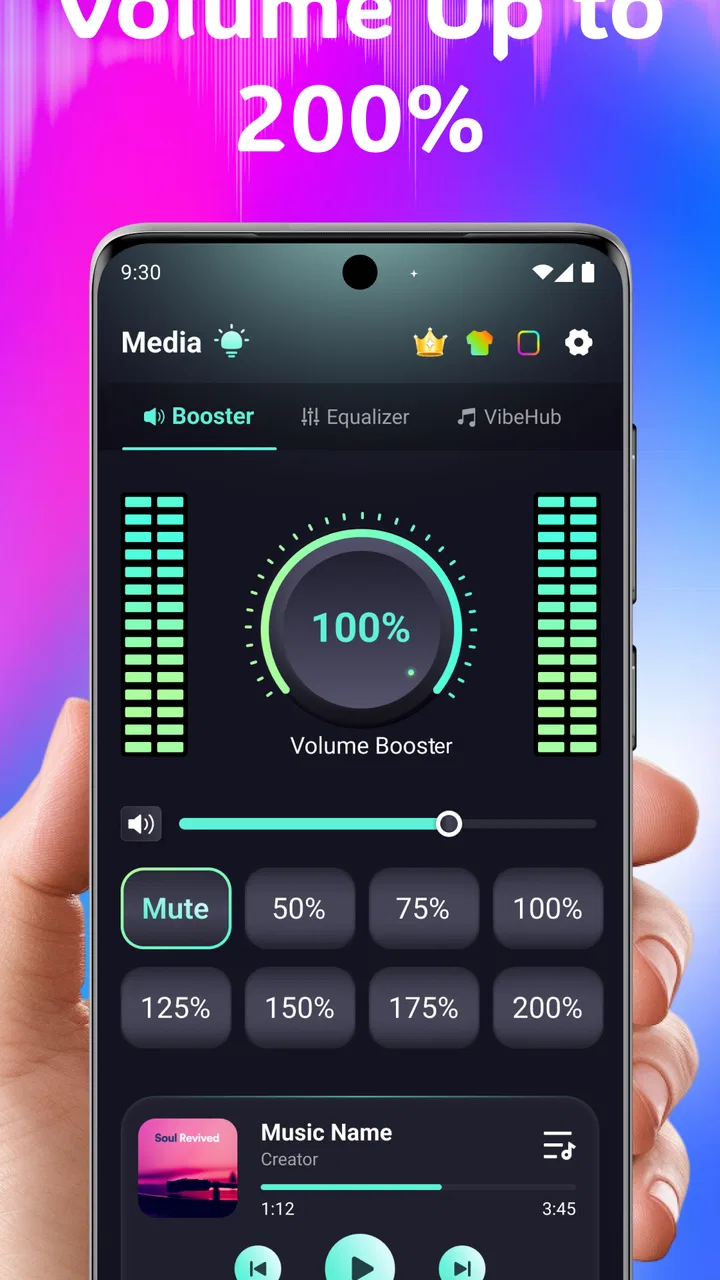
Volume Booster Bass Booster EQ
- 4.6
- Rating
- 100.00K
- Installs
- Free
- Price

 Analysis by App-foxy
I approached Volume Booster Bass Booster EQ as a practical listening tool rather than a magic fix for every quiet phone. Its purpose is straightforward: give you more control over loudness, bass, and equalizer adjustment, with support for headphones. That sounds simple, but the useful question is whether you actually need an extra layer between your device and your audio apps. In my experience, the answer depends less on the headline promise and more on where, how, and with what equipment you listen.
This is a free medical-category app from Best Translate LLC, although its everyday use is clearly centered on personal audio. It is available to an Everyone audience and requires Android 9 or later. The current release is version 1.2.5, and the app has passed the early curiosity stage with over 100 thousand installs. Its average score sits at 4.6 from 792 ratings, with 196 written reviews, which suggests that many users find the basic idea useful while still leaving room for individual differences between phones, headphones, and listening habits.
How I Decided Whether the Booster Was Worth Using
My first test was not “Can it make sound louder?” Almost any booster that changes the output level can appear impressive in a quick comparison. The more important test was whether the extra volume remained usable, whether voices and instruments stayed understandable, and whether the controls helped me solve a real listening problem. A good result should make a podcast easier to follow on a noisy commute, or make a quiet video more comfortable, without turning every track into a harsh wall of sound.
You May Also Like

 Blood Strike: 2.5 Anniversary
Blood Strike’s Loadouts Turn Every Drop Into a Tactical Gamble
A close look at Blood Strike’s custom loadouts: how fast access to signature weapons reshapes its battle royale rhythm, rewards preparation, and narrows the gap between fights.

 Pandora - Music & Podcasts
Pandora’s Music Is Easy to Start, but Harder to Recover
Pandora’s strength is its low-effort path from a seed to a station. Its weak spot is how much confidence it asks you to place in connection, setup, and quiet recovery.

 8 Ball Pool
 Is Built on Rivalries, Rematches, and Routine
A close look at the rivalries, rematches, shared routines, and unanswered safety questions that turn a quick pool match into a persistent mobile community.

 Samsung Music
’s Quiet Strength Is Playing What You Already Own
Its reach comes less from spectacle than from dependable access to a personal library. That simplicity is both the app’s strongest retention engine and its ceiling.

 AccuWeather: Weather Radar
AccuWeather Review: A Quick, Clear Forecast for Everyday Decisions
For everyday plans, the best forecast is the one you can understand quickly. AccuWeather makes rain timing, radar, and local conditions easy to act on, with a few trade-offs.

 Hill Climb Racing
Why Hill Climb Racing Still Turns Crashes Into One More Run
A tiny car, a bumpy hill and one more upgrade: Hill Climb Racing keeps resurfacing because its simple chaos makes every near-miss feel personal.
More From Our News Desk
View All News


I also looked at four practical questions. Does the app help when the phone’s normal volume steps feel too broad? Can the bass and equalizer controls be used gently instead of forcing an exaggerated effect? Does it work sensibly with headphones rather than only through the built-in speaker? Finally, is the improvement worth adding another control to a setup that may already include system audio settings, a streaming app’s equalizer, or controls on the headphones themselves?
Those questions matter because volume is not the same thing as clarity. If speech is muffled by a poor recording, increasing the entire signal may also increase background noise. If earbuds have weak low frequencies, adding bass may create distortion instead of depth. I found the app more convincing when used as a small adjustment tool than when treated as a permanent “maximum everything” switch.
What the Main Controls Are Good For
The volume control is the most immediately useful part for people who feel limited by the normal Android steps. A small change can be meaningful when you are trying to hear a spoken recording, an online lesson, or a video with unusually low mastering. The bass booster is more situational. It can make music feel fuller on thin-sounding headphones, but the right setting depends heavily on the headphones and on the recording itself.
The equalizer is where the app becomes more than a simple loudness slider. I prefer using it to correct a specific annoyance: reducing a sharp high end, giving speech a little more presence, or adding restrained low-end weight. Broad boosts across the entire range are tempting, but they usually leave less headroom and can make the result sound muddy. My practical advice is to change one area at a time, listen for a few seconds, and return to a neutral setting whenever the sound becomes tiring.
Headphone support is especially relevant because many people will use this app privately rather than trying to fill a room with a phone speaker. Headphones can reveal changes more clearly, but they also expose aggressive processing. A setting that sounds exciting for one song may become uncomfortable during a long podcast. I would treat the headphone mode as a reason to adjust carefully, not as permission to push the output as far as possible.
A Realistic Everyday Scenario
Imagine watching a recorded class in a kitchen while an extractor fan and running water compete with the speaker. The recording itself is quiet, and the phone’s regular volume buttons jump from slightly too soft to louder than necessary. In that situation, I would use the booster for a modest increase, then use the equalizer to improve speech presence rather than adding bass. That combination is more useful than simply chasing the largest number on the volume control.
For a different situation, consider listening to music through inexpensive wired headphones during an evening walk. If the sound feels thin, a restrained bass adjustment may add body. However, I would check the result with several songs before keeping it enabled. A bass setting that helps electronic music can cover the detail in acoustic recordings or make spoken content less natural. The ability to change the sound is valuable, but it also makes self-discipline part of the experience.
There is a third use that is easy to overlook: matching different sources. One video may be mastered quietly while another is already loud. Instead of changing the phone’s general volume repeatedly, I can use the app as a temporary correction layer. I would still reset the adjustment afterward, especially before switching to headphones or another app, because a setting that was comfortable for one source may be excessive for the next.
Where This App Has the Strongest Case
The clearest advantage is convenience. A person who wants one place for volume, bass, and equalizer changes does not have to rely entirely on separate controls scattered across Android, a music player, and a headphone companion app. That matters for casual listeners who do not want to learn audio terminology but still want more control than the standard volume buttons provide.
It also suits people who move between listening devices. The built-in speaker, wired headphones, and Bluetooth headphones rarely sound identical. A single neutral setting is not always ideal for all three. I would keep adjustments conservative and change them when the output device changes. This is more practical than expecting one bass profile to sound equally good everywhere.
Another strength is that the app is free to start using. That lowers the barrier for someone who only wants to test whether extra equalizer control solves a problem. The presence of optional in-app purchases, ranging from $6.99 to $69.99 per item, is worth considering before committing to a paid upgrade. I would first establish that the basic experience genuinely improves my listening routine, then decide whether additional spending makes sense.
The strong user response is encouraging, but I would not treat the 4.6 average as a guarantee for every device. Audio behavior can vary with Android versions, manufacturers, headphones, and the source app. A booster may be very effective on one phone and less noticeable on another. The sensible approach is to judge it with your own most-used headphones and your own quiet recordings, not with a single loud music track.
Limitations I Would Keep in Mind
The main limitation is the trade-off between loudness and sound quality. Pushing output beyond what the device or headphones handle comfortably can introduce clipping, harshness, or fatigue. A louder result may seem better during a quick comparison simply because it is louder. After several minutes, however, the same setting can become unpleasant. I recommend making the smallest change that solves the problem and then leaving it alone.
Bass boosting has its own cost. Low frequencies need room in the signal, and adding too much can reduce clarity in vocals and instruments. It can also make a phone speaker vibrate without producing genuinely deeper bass. If the hardware cannot reproduce the added low end, the app cannot manufacture the missing physical capability. This is one reason I see the equalizer as a correction tool, not a replacement for better headphones or speakers.
The app is also not the right answer for every quiet-audio complaint. If the problem is a damaged headphone cable, a blocked speaker grille, a Bluetooth connection issue, or a badly recorded file, software amplification may only hide the cause temporarily. I would check the device, try another source, and compare another pair of headphones before blaming the volume controls.
People who already use a well-designed music player with a reliable equalizer may not gain much from adding another layer. The same is true for owners of headphones with their own carefully tuned app. In those cases, the extra control can create confusion: one equalizer changes the sound, another changes it again, and the final result becomes difficult to reproduce. If your current setup already gives you the adjustment you need, keeping it simple may be better.
How It Compares With the Usual Alternatives
The first alternative is Android’s built-in volume control. It is simpler, predictable, and usually the safest starting point, but it offers fewer ways to shape the sound. If you only need to raise or lower playback occasionally, the system control is probably enough. If you regularly find the steps too coarse or want to adjust bass and tonal balance, this app has a more relevant role.
The second alternative is an equalizer built into a music or video app. That option can be better when you want settings tied to one service or one type of content. It may keep music adjustments separate from podcasts, for example. The drawback is that the control may not apply elsewhere. This booster is more appealing when your listening is spread across several apps and you want a general adjustment rather than a single-player solution.
A third alternative is a headphone manufacturer’s companion application. That can be the better choice when your headphones support device-specific tuning, because the manufacturer may understand the hardware more precisely. On the other hand, such apps are less useful if you switch between brands or use ordinary headphones. Volume Booster Bass Booster EQ makes more sense as a flexible, general-purpose option, provided you are willing to tune by ear.
Finally, there is the hardware solution: better headphones, a speaker with stronger output, or a small external audio device. Hardware is usually the more durable answer when the real issue is weak reproduction, but it costs more and is less convenient than trying a free app. I would use this app as a low-cost experiment before buying equipment, while recognizing that software cannot overcome every hardware limit.
What Switching to It Actually Involves
The cost of switching is not just financial. It is also the time needed to learn which adjustment belongs to which device and source. If I move from a phone speaker to headphones without checking the level, the previous setting may no longer be comfortable. I would build a simple habit: start near neutral, test with familiar speech, make one change, and reset when changing equipment.
The paid options deserve the same measured approach. Since the app is free to download and use, I would not purchase anything immediately. First, I would test it across a spoken recording, a quiet video, and several music styles. If the controls consistently solve a problem that the phone’s normal settings cannot, a purchase may be easier to justify. If the benefit appears only in one unusual situation, staying with the free access or returning to the system controls is more sensible.
There is also a health consideration. The app belongs to the medical category, but I would not interpret that classification as medical advice or as evidence that louder listening is harmless. A volume booster can make it easier to exceed a comfortable level, especially with headphones. I would take listening breaks, avoid using extra volume to compete with very loud surroundings, and lower the setting if my ears feel strained. More output is not automatically better output.
Who Should Use It and Who Should Skip It
I would recommend trying it if you often encounter quiet videos, uneven audio between apps, or headphones that need a small tonal adjustment. It is particularly suitable for someone who wants volume, bass, and equalizer controls in one app without buying hardware first. It can also help a listener who understands that the best result may be a gentle boost rather than the maximum available level.
I would be more cautious if you mainly use high-quality headphones with a dedicated companion app, or if your preferred music player already provides all the equalizer control you need. Adding another processing layer may not improve anything. I would also skip it as a supposed repair for failing hardware, distorted Bluetooth audio, or a recording whose speech is fundamentally unclear.
It is not ideal for someone who wants a completely automatic experience with no experimentation. The app gives you more control, but that means you must listen critically and adjust responsibly. Users who prefer every source to sound exactly as the phone manufacturer intended may find the extra options unnecessary.
My Recommendation After Testing the Idea
I see Volume Booster Bass Booster EQ as a useful utility for targeted audio problems, not as a permanent loudness button. Its combination of volume adjustment, bass control, equalizer access, and headphone support gives it a clear purpose for Android users who find the standard controls too limited. The free entry point makes it easy to test without first replacing headphones or buying an external speaker.
My recommendation is strongest for podcasts, lessons, videos, and mixed-device listening, where a modest correction can make a real difference. I would use it carefully for music and avoid assuming that a stronger bass or louder output is automatically an upgrade. The best workflow is to begin with a neutral setting, adjust one control at a time, compare familiar speech and music, and reset when changing devices.
At the same time, I would not choose it over a good hardware solution when the device itself is weak, damaged, or unable to reproduce the sound you want. Nor would I pay for extra access before proving that the app fits my routine, especially with individual in-app purchases between $6.99 and $69.99. For many casual listeners, the free experience may be all they need.
Overall, this is a sensible app to try when your complaint is “the sound needs a little more control,” rather than “my phone cannot produce usable audio.” Its high average rating and broad install base make it worth investigating, but your own headphones and listening habits should make the final decision. Used with restraint, it can turn awkward volume steps and thin audio into a more comfortable everyday setup; used aggressively, it can make distortion and listening fatigue arrive faster.
FAQs for Volume Booster Bass Booster EQ
01What is Volume Booster Bass Booster EQ and what does it do?
Volume Booster Bass Booster EQ is an app designed to enhance the audio experience on your device. It amplifies the sound output and boosts bass levels, providing a richer and more immersive audio experience. The app also includes an equalizer to customize sound settings according to your preferences.
02Is Volume Booster Bass Booster EQ safe for my device?
Yes, the app is generally safe for your device. However, it's important to use it responsibly, as excessive volume levels can potentially harm your speakers or hearing. It's recommended to start with moderate settings and gradually adjust the sound to find a comfortable and safe level.
03Does Volume Booster Bass Booster EQ work with all music apps?
The app is designed to work with most music and streaming apps, enhancing their audio output. However, compatibility can vary depending on your device's hardware and software. It's best to check user reviews or test the app with your preferred music apps to ensure optimal performance.
04Can I use Volume Booster Bass Booster EQ while using headphones or Bluetooth speakers?
Yes, Volume Booster Bass Booster EQ can be used with headphones and Bluetooth speakers. The app aims to improve sound quality across different audio devices, but make sure to adjust the settings appropriately to avoid distortion and ensure the longevity of your audio equipment.
05Is Volume Booster Bass Booster EQ free to use?
The app is available as a free download, offering basic features at no cost. However, there may be in-app purchases or a premium version that unlocks advanced features and removes ads. Make sure to check the app store description for specific details regarding pricing and available features.
Pros
- User-friendly interface for quick adjustments.
- Significant boost in sound quality.
- Customizable EQ presets for different genres.
- No noticeable lag or crashes during use.
- Works well with both wired and Bluetooth devices.
Cons
- Ads can be intrusive at times.
- Some features require a premium upgrade.
- May distort sound at highest settings.
- Limited support for older device models.
- Occasional compatibility issues with specific apps.

Volume Booster Bass Booster EQ
Gallery